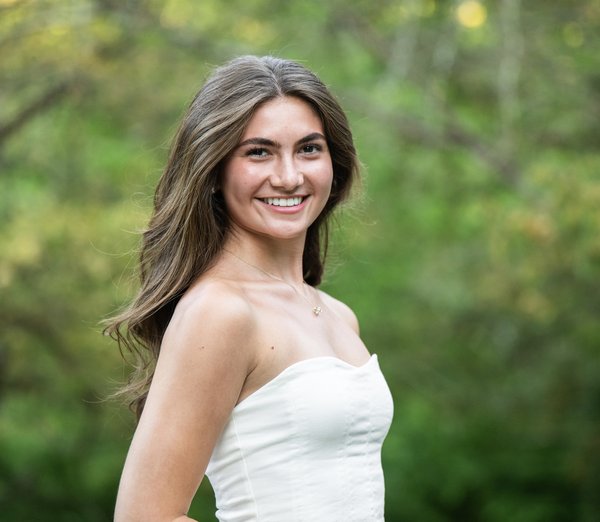
Hi! I'm Isabella, a recent Radnor High School graduate heading to Northeastern University this fall. I've been babysitting in the Wayne area for over five years and genuinely love spending time with kids β from arts & crafts and outdoor play to homework help and bedtime routines. As the oldest of five siblings, I've grown up caring for kids of all ages and bring that real, hands-on experience to every family I work with.
Energetic and detail-oriented high school senior with a strong background in leadership, organization, and customer-facing roles. Passionate about creating welcoming environments and delivering thoughtful, personalized experiences. Known for strong communication skills, creativity, and a proactive, positive work ethic.
We'll email you a confirmation right away and a reminder before your session,
so please double-check your email address above.
This sends Isabella Bucci a request β they'll confirm they can take a standing weekly slot before anything is booked.
I'll confirm within 24 hours.
β° 1-hour minimum per booking Β· π΅
Payment arranged directly with Isabella Bucci after each session
π Need to change your time? Click Cancel / Reschedule at the top
π Want to add more dates later? Come back and book again anytime
Free cancellation with 48+ hrs notice Β· $10 fee within 48 hrs
β
Thank You for Booking!
Your request has been received.
I will be in touch within the next 24 hours to confirm everything.
You can come back to this page anytime to check, cancel, or reschedule your booking.
Need to make changes? Use the Cancel button to manage your bookings.
π
Admin Access
Enter your password to manage availability.
Incorrect password. Try again.
π Manage Availability
Tap any date to select it, then use the panel below to block/unblock it or add time blocks.
π Add your bookings to your phone's calendar
Subscribe once and every booking shows up automatically in your Apple or Google calendar β and stays in sync. Keep this link private.
How do I add it? (tap for steps)
iPhone: Settings β Calendar β Accounts β Add Account β Other β Add Subscribed Calendar β paste the link. Google Calendar: on a computer, go to Google Calendar β next to "Other calendars" click β β "From URL" β paste the link.
π Welcome! Let's get you set up
Three quick steps and your page is ready to share:
Set your availability β tap dates on the calendar below to block off days you're busy.
Personalize your page β scroll down to add your bio, photo, and pick your color.
Invite your families β send them your booking link with the button below.
π To get back to this admin later: tap your name 5 times at the top of your page (it's hidden so families can't see it), then enter your password.
Tap all the days you'll be away (like a whole week), then hit Make unavailable below β no need to do them one at a time.
0 days selected
Available
Blocked
Selected
β° Block out a specific time (e.g. doctor's appointment)
π Your Public Profile
This is what parents see on your page. Everything here is optional β leave it blank to hide it.
Not sure what to write?
Tap one to use it as a starting point, then make it your own:
π° Unpaid Cancellation Fees
π΅ Earnings
Date
Parent
Hours
Earnings
Type
Status
π Regular Sitter Requests
Families asking for a standing weekly slot. Confirm one and the next 8 weeks are added to your calendar automatically (dates you've blocked or already booked are skipped).
π Bookings
π Invite a family
Here's a warm little message you can send families so they know how to book you. Edit it if you like, then copy it or send it straight from your phone β it goes from your number or email, so families see it's really you.
Or send it to one family right now. Pick a family you already have β or type a name to search β and their number and email fill in automatically:
β Save a new family to your list
Families who've booked you already show up automatically. Add ones who haven't yet here.
No rush β you can always come back to this from the βInvite a familyβ button in your admin panel.
Manage Bookings
Enter the email address you used when booking to look up your reservations.